Digital Transformation
Mis à jour le
9/4/2026
16/9/26
Tracklab and Your ERP: The Complete Integration Guide
TL;DR— Tracklab runs in complete autonomy, with no integration required — even if you haven't chosen your ERP yet. Tracklab and your ERP can operate fully independently of each other for as long as needed: connecting them is a choice, never a technical requirement. When you're ready, three scenarios cover most needs: automatic supplier data import, status synchronization back to the ERP, and document data extraction to the PLM. The result: −50% manual re-entry, 100% synchronized data, 100% informed purchasing decisions. The connection relies on a REST API and/or SFTP file exchange, set up according to your ERP's capabilities.

Tracklab and Your ERP: The Complete Integration Guide
TL;DR — Tracklab runs in complete autonomy, with no integration required — even if you haven't chosen your ERP yet. Tracklab and your ERP can operate fully independently of each other for as long as needed: connecting them is a choice, never a technical requirement. When you're ready, three scenarios cover most needs: automatic supplier data import, status synchronization back to the ERP, and document data extraction to the PLM. The result: −50% manual re-entry, 100% synchronized data, 100% informed purchasing decisions. The connection relies on a REST API and/or SFTP file exchange, set up according to your ERP's capabilities.
Choosing or rolling out an ERP right now? That's actually the right moment to start. Tracklab doesn't plug into the ERP you'll have tomorrow — it builds, starting today, the clean and structured supplier database that your future ERP will need to receive anyway. See the dedicated section below.
In a manufacturing and food-industry market where supplier data flows between dozens of systems — ERP, PLM, quality portals, purchasing tools —, ERP integration is no longer a topic reserved for IT. It has become a direct operational concern for purchasing and quality managers: how do you avoid double data entry? How do you make sure a supplier status updated in Tracklab flows back into SAP or Dynamics? How do you feed the PLM without manually re-entering technical data sheets?
This guide answers these questions concretely. It's written for teams already running an ERP — SAP, Sage, Cegid, Microsoft Dynamics, Oracle, Divalto, Sylob or any other system —, but just as much for teams currently in the middle of an ERP decision (RFP under way, a choice expected in a few months) who are wondering whether they should wait for that decision before starting a supplier-compliance project.
Good news before we start: Tracklab works perfectly on its own, with no integration at all. Integration is an accelerator, never a prerequisite.
1. Why connect Tracklab to your ERP?
Supplier data lives in too many places at once
In most industrial organizations, supplier data is scattered: the supplier database sits in the ERP, quality documents live in shared folders, qualification statuses sit in spreadsheets, and technical product data sheets live in the PLM or in email inboxes. The result: every team works from its own version of the truth.
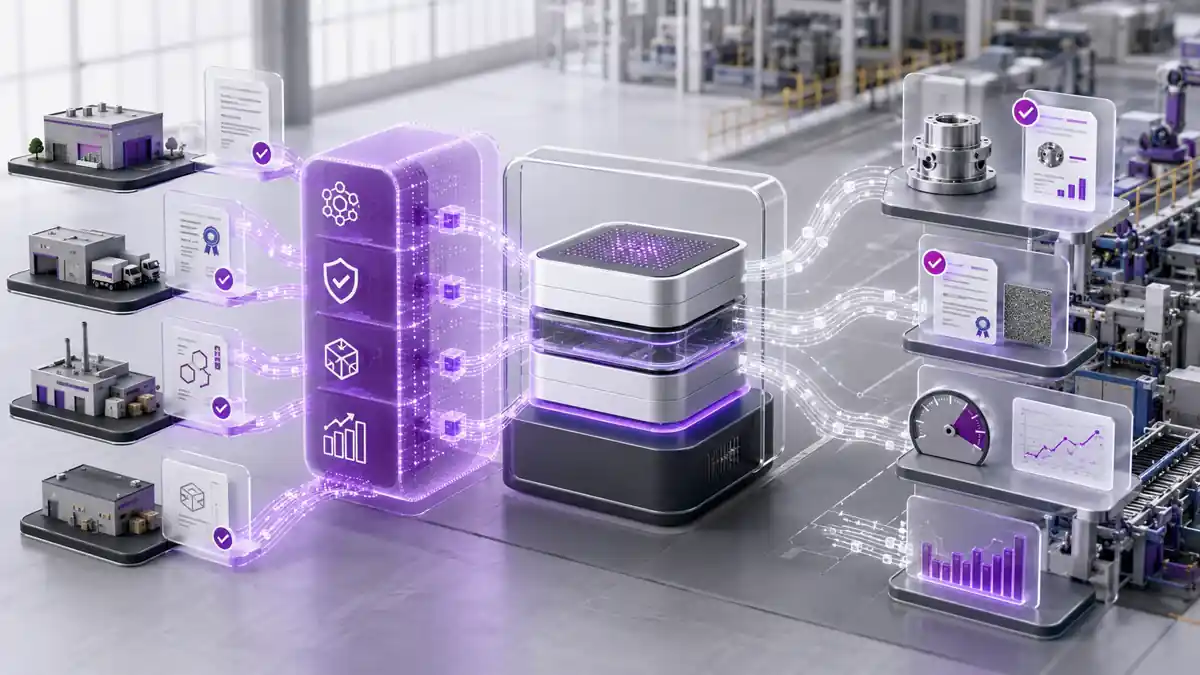
Connecting Tracklab to your ERP creates a consistent data flow between these systems:
The ERP stays the source of truth for the supplier master data and purchase orders.
Tracklab becomes the source of truth for qualification, document compliance, and product data.
The PLM benefits from data extracted automatically from supplier documents.
Tracklab and your ERP work perfectly well without each other
Tracklab doesn't need any connection to an ERP to do its job: document collection, supplier scoring, expiry alerts and regulatory compliance tracking all run in complete autonomy, with an initial manual or file-based import. Symmetrically, your ERP keeps working exactly as it does today, whether or not it's connected to Tracklab. Connecting the two systems is an option you switch on whenever you're ready — never a technical dependency in either direction.
Haven't chosen your ERP yet? Don't pay for data cleanup twice
This is a common situation, and it's not a reason to delay starting with Tracklab — if anything, it's a good reason not to wait. An ERP selection project and a supplier-compliance project don't run on the same calendar: choosing a vendor and rolling it out often takes several months, while documentary and regulatory obligations — supplier qualification, customer specifications, packaging obligations such as EPR/PPWR — don't wait.
During that window, Tracklab runs in total autonomy and produces exactly what a future ERP will need: a deduplicated supplier database, with product data structured and validated by suppliers themselves. This cleanup and structuring work has to happen once, sooner or later, before any ERP migration — doing it upfront with Tracklab, rather than migrating a messy supplier database into the new ERP, means you avoid paying for that cleanup twice. Whichever vendor you end up choosing, the Tracklab database can then connect to it via REST API and/or SFTP file exchange, depending on what the chosen ERP supports.
The measurable benefits of ERP synchronization
Integrating your supplier ERP with Tracklab produces concrete, measurable effects:
−50% manual re-entry: data entered in the ERP no longer needs to be re-typed into Tracklab, and vice versa.
100% informed purchasing decisions: buyers see each supplier's Tracklab qualification status directly in their ERP, without switching tools.
100% synchronized data: no more drift between the ERP's supplier database and Tracklab's quality data.
An interoperability logic, beyond just the ERP
The ERP × Tracklab connection is part of a broader information-system interoperability logic: just as an ERP–CRM integration lets sales reps see billing data without leaving their CRM, the Tracklab integration lets buyers and quality teams work in their everyday tools while benefiting from the depth of data managed in Tracklab.
2. The 3 ERP × Tracklab integration scenarios
Three scenarios cover most of the needs seen across manufacturing and food-industry companies — what the platform collects and cleans up, what it exposes, and what the ERP consumes in return. They're independent: you can activate one, two, or all three depending on your maturity and priorities, each via REST API and/or SFTP file exchange.
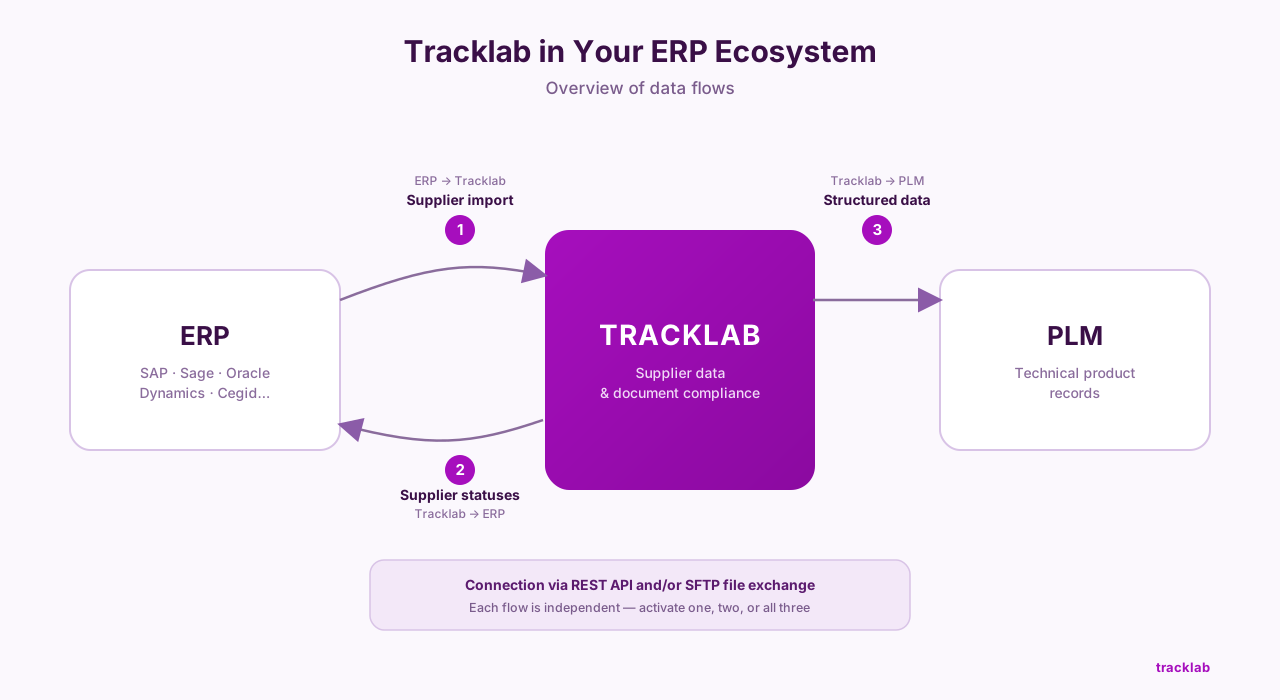
1. Automatic supplier data import from the ERP
The problem: when a new supplier is created in the ERP, the quality team has to re-enter it manually in Tracklab to start the qualification process. With dozens of active suppliers, this time-consuming task creates errors and delays.
The flow: ERP (new supplier created) → REST API and/or SFTP file exchange → Tracklab (supplier record created automatically) → automatic trigger → qualification process launched (document collection, scoring).
What this changes in practice:
Every supplier referenced in the ERP is automatically present in Tracklab, with no manual action.
Duplicates are eliminated by matching on the ERP identifier.
Synchronization is continuous: any change in the ERP (name, registration number, address) is reflected in Tracklab.
This scenario is especially well suited to purchasing teams managing a large supplier panel who want Tracklab always aligned with the official ERP supplier database.
2. Supplier status synchronization to the ERP (purchasing decisions)
The problem: a supplier has just been suspended in Tracklab following a negative quality audit. But buyers, who work in the ERP, don't know it yet. They can keep placing orders with that supplier for several days.
The flow: Tracklab (supplier status updated to "Suspended") → REST API and/or SFTP file exchange → ERP (supplier status field updated) → automatic block or buyer alert → purchasing decision secured.
What this changes in practice:
Buyers see the Tracklab qualification status directly in their ERP: Qualified, In progress, Suspended, Not qualified.
Orders can be blocked automatically for unqualified suppliers, based on rules configured in the ERP.
Traceability is complete: every status change is timestamped and justified in Tracklab.
This is the most requested scenario among purchasing and quality managers, because it directly secures purchasing decisions without changing buyers' day-to-day habits.
3. Document data extraction to the PLM / ERP
The problem: technical data sheets, certificates of analysis and specifications received from suppliers contain critical data (composition, nutritional values, allergens, technical characteristics). This data has to be manually re-entered into the PLM or the ERP to populate product records. It's slow, costly, and error-prone.
The flow: supplier sends a document (data sheet, CoA, spec) → received in Tracklab → Tracklab's AI extracts the critical data from the document → REST API and/or SFTP file exchange → PLM / ERP (product record enriched automatically) → R&D/quality team validation → validated, usable data.
What this changes in practice:
Data extracted from supplier documents (nutritional values, allergens, physico-chemical characteristics) feeds the PLM directly, with no re-entry.
R&D projects move faster: teams have product data as soon as the supplier document is received.
The risk of transcription errors is eliminated.
This scenario is especially valuable for food-industry manufacturers managing hundreds of product references who need to keep product records up to date in their PLM — notably multi-site water and beverage players juggling many reference and packaging variants. (See our food-industry customer stories.)
3. How does the integration work technically?
In practice, two methods let you connect Tracklab to your information system: a REST API, for structured, near-real-time exchanges, and SFTP file exchange, for less open ERPs or batch synchronization. There is currently no ready-made, vendor-specific connector: every integration is set up case by case, with the Tracklab team, based on your ERP's technical capabilities. Details on the API and on Tracklab's integrations are available on our platform.
REST API: the standard, recommended method
Tracklab exposes a documented REST API, which lets your ERP or any third-party system send and receive data in a structured way. The REST API uses standard HTTP requests (GET, POST, PUT, DELETE) and lightweight formats like JSON, making it compatible with nearly all modern ERPs that have an API layer.
Advantages:
Bidirectional: reads and writes in both directions.
Near-real-time, depending on the chosen call frequency.
Documented: no dependency on a proprietary implementation.
Compatible with any ERP that has an API layer (SAP, Oracle, Dynamics, Cegid, Sage, Divalto, Sylob…).
SFTP file exchange: the alternative for less open ERPs
When an ERP doesn't have an accessible API — a common case for on-premise or older ERPs —, the connection can be made by dropping files via SFTP (CSV export/import, for example). This is a batch-based approach, less immediate than an API but just as reliable, and often simpler for IT to set up since it doesn't require opening up an API.
Advantages:
Compatible with older or closed ERPs, with no API development needed on the client side.
Controlled sync frequency (daily, weekly…), well suited to volumes that don't change often.
Usually lighter to implement for IT than an API integration.
Comparing the two methods
4. Which ERPs are compatible with Tracklab?
In an increasingly competitive sector, manufacturers use a wide variety of ERPs. The good news: thanks to its open REST API and the option of an SFTP file exchange, Tracklab can connect to any ERP capable of sending or receiving HTTP calls, or exporting/importing files — whichever vendor you end up choosing.
Examples of compatible ERPs:
SAP (S/4HANA, ECC)
Oracle (Fusion Cloud, NetSuite, E-Business Suite)
Microsoft Dynamics 365
Sage X3 / Sage 100
Cegid
Divalto
Sylob
Infor
Odoo
On-premise or legacy ERPs: even for older ERPs with no native API, integration is still possible via file exchange (CSV, EDI, SFTP). This approach is less real-time than an API, but remains fully functional for regular synchronization.
Cloud ERPs: modern cloud ERPs generally expose well-documented REST APIs, which makes integrating with Tracklab easier.
Note: Tracklab runs as SaaS. Integrating with a cloud or on-premise ERP requires no additional components to be installed on Tracklab's side. Everything goes through the API or a file exchange.
5. What does an integration project look like?
Every integration is different depending on the scope chosen (a single scenario or all three), how technically open your ERP is, and the IT resources available. There's no generic timeline that applies to every project: the schedule is scoped with you, case by case, once the scope is defined. What we can describe, though, are the broad stages of a typical project:
Scoping: identifying priority flows (which fields, in which direction, at what frequency), auditing the existing ERP's technical capabilities, choosing the method (REST API or SFTP).
Implementation: configuring the flow between the two systems, field mapping, handling errors and duplicates.
Testing and acceptance: testing with real data, validation by the relevant business teams (purchasing, quality, IT).
Go-live and monitoring: cutover, team training, monitoring the exchanges.
Important reminder: throughout the integration project — and for as long as your own ERP selection project takes — Tracklab keeps running autonomously. Your quality and purchasing teams are never blocked waiting on an ERP connection.
6. FAQ
Is ERP integration required to use Tracklab? No. Tracklab runs in complete autonomy, with no integration required beforehand. You can start using Tracklab from day one, import your suppliers manually or via a CSV file, and turn on the ERP integration whenever you're ready. Integration is an accelerator, not a prerequisite.
We haven't chosen our ERP yet (RFP in progress): can we still start with Tracklab? Yes, and it's actually the most common scenario among our customers going through an IT-system transformation. Choosing an ERP and rolling it out typically takes several quarters; starting Tracklab in parallel lets you build, right now, a clean, deduplicated and documented supplier database — exactly the material the future ERP will need to receive. Once the vendor is chosen, integration happens via the Tracklab REST API, with no dependency on a specific ERP and no work to throw away.
Does Tracklab have a native ERP connector for SAP or Dynamics? Tracklab exposes an open, documented REST API, compatible with SAP, Microsoft Dynamics, Sage, Cegid and most ERPs on the market. There is no native, ready-made marketplace connector today — every connection is set up via the REST API and/or an SFTP file exchange, tailored to your ERP. Contact the Tracklab team to discuss the options for your specific ERP.
Is our supplier data secure during ERP synchronization? Yes. Exchanges between your ERP and Tracklab are encrypted (HTTPS/TLS). Authentication relies on secure API tokens. Tracklab is hosted as SaaS on European cloud infrastructure, with regular backups and a security policy aligned with market standards.
Can Tracklab integrate with an on-premise (non-cloud) ERP? Yes. If your on-premise ERP exposes a REST API or web services, integration is direct. If not, integration via file exchange (CSV, EDI, SFTP) is possible. Synchronization will be less real-time (daily or weekly), but remains functional for most use cases.
What is an "ERP connector" in Tracklab's context? An ERP connector is the piece that handles translating and transporting data between your ERP and Tracklab. It can take the form of custom development using the Tracklab REST API, or a file exchange via SFTP. It handles field mapping, error handling, and sync frequency.
Is ERP synchronization real-time or batch? Both are possible. Near-real-time synchronization (via an event-triggered REST API) is recommended for supplier statuses, where responsiveness is critical. Batch synchronization (via SFTP, hourly or daily) is often enough for importing the supplier database, which changes less frequently.
Currently weighing up your ERP options and not sure where to start?
Let's talk about your specific situation — your future ERP choice doesn't need to be finalized to get started.
Useful sources
Tracklab — Integrations & interoperability — Tracklab's official integrations page (ERP, PLM, internal tools).
IBM — What is ERP integration? — IBM's definition and methodology for ERP integration.
SAP — ERP integration: when, why, how — SAP's practical guide to ERP integration challenges and methods.
Sylob — APIs and web services: essential tools for ERP integration — An industrial ERP vendor's perspective on integration APIs.
Take control of your supplier data.
See how Tracklab centralizes, validates and keeps your supplier and product data up to date, so your teams can work faster with reliable information.
See Tracklab in action